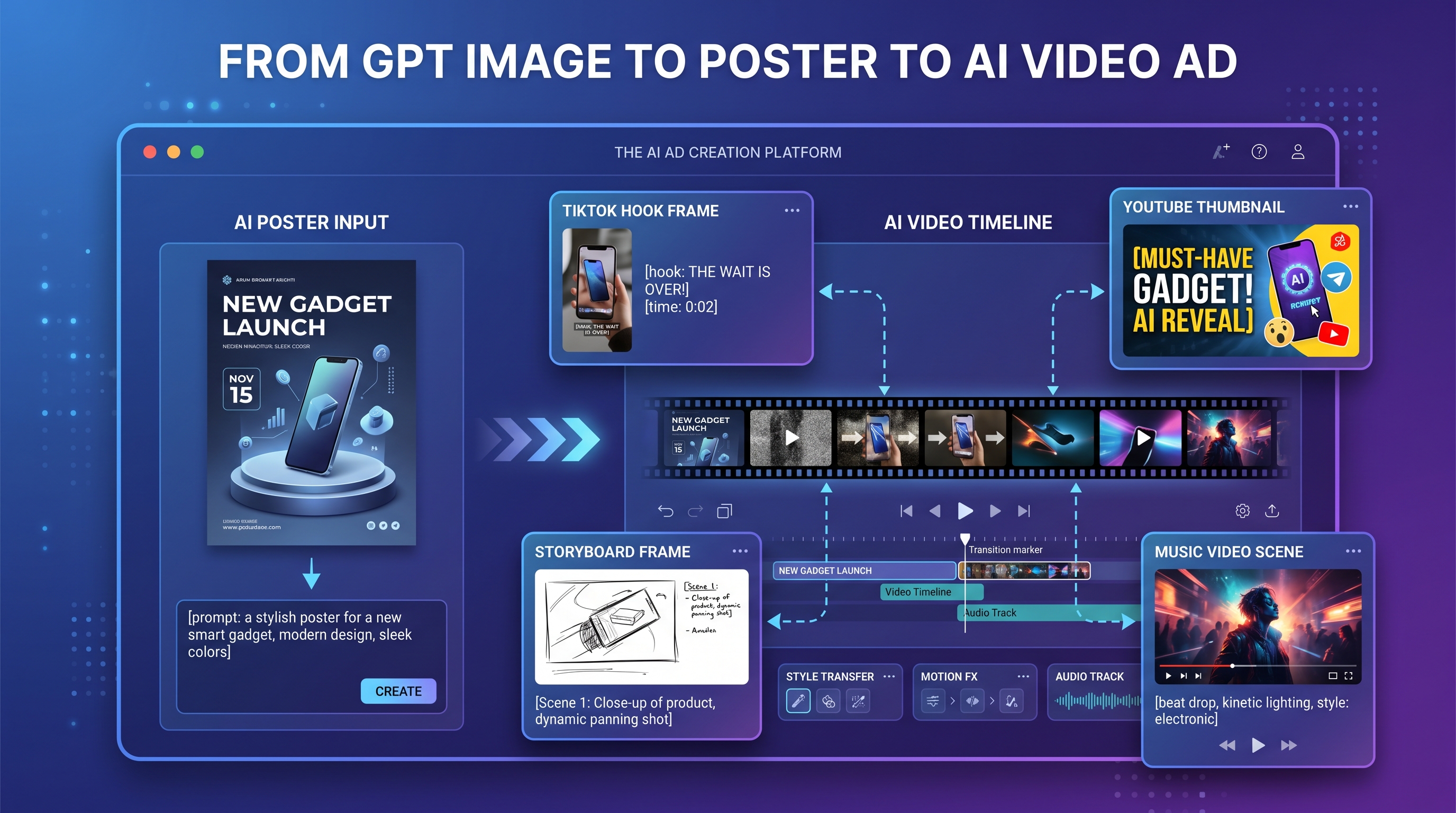
A strong campaign rarely begins with a finished video. More often, it begins with one visual idea: a product poster, a thumbnail, a storyboard frame, or a hero image that makes people stop scrolling. That is why GPT Image 2 is useful for modern creators. It can help shape the first visual language of a campaign before the project moves into motion.
For official access and technical reference, creators can start with the official ChatGPT Images 2.0 release or explore the OpenAI image generation API. For a more direct creative workflow, the GPT Image 2 AI image generator on VideoWeb AI gives creators a browser-based way to build posters, product visuals, thumbnails, and storyboard frames before turning them into video-ready assets.
The key is to stop thinking of AI images as isolated outputs. A GPT Image 2 poster can become the opening frame of an ad. A product mockup can become a short launch clip. A thumbnail can become a TikTok hook. A storyboard image can become the first step toward a music video, trailer, or social campaign.
Why GPT Image 2 Is More Than a Static Image Generator
GPT Image 2 is not only useful because it can create attractive images. Its bigger value is that it helps creators plan visuals with purpose. A good campaign image needs more than style. It needs a clear focal point, readable text, a strong layout, and enough visual space to support future editing or animation.
That makes the model useful for marketers, creators, musicians, small businesses, and social media teams. Instead of starting with a blank design board, users can describe the campaign goal and ask for an image that already understands the format. For example, a prompt can request a vertical product poster with headline space, a clean call-to-action area, studio lighting, and a clear product focus.
This is where ChatGPT Image 2 ads become more practical than random image experiments. When the prompt includes the product, audience, platform, text placement, mood, and ratio, the image becomes a campaign draft rather than just an illustration.
How to Create a Campaign Poster with Readable Text and Strong Layout
A campaign poster should communicate quickly. Before adding motion, the still image needs to work on its own. The viewer should know what the product is, what the offer or message is, and where to look first.
A useful poster prompt should include six things: the main subject, campaign purpose, headline, layout, color palette, and final platform. For example, instead of writing “make a skincare ad,” a stronger prompt would say: “Create a vertical 9:16 product launch poster for a luxury skincare serum, with the bottle centered on a soft cream background, warm studio lighting, elegant headline text at the top, and empty space at the bottom for a call-to-action.”
When using an AI poster generator, readable text should be treated as part of the composition. Keep the headline short. Avoid long paragraphs. Ask for clean spacing, high contrast, and simple visual hierarchy. If the image may later become a video, leave room for camera movement, text animation, or a product reveal.
For broader visual testing, an AI image generator can help produce alternate directions: one premium, one playful, one cinematic, and one minimalist. This gives creators options before they commit to the video version.
Making Product Mockups, Social Ads, and Thumbnails
Product mockups are one of the easiest ways to turn AI image generation into campaign planning. A creator can test packaging, lighting, props, backgrounds, and lifestyle scenes before producing the final ad. For an AI product video, the still image should already suggest motion. A drink can have splashing water around it. A sneaker can appear mid-launch. A phone can float above a glowing interface.
Social ads need even sharper planning. People scroll fast, so the image must be readable at a small size. If the campaign is made for Instagram, TikTok, or YouTube Shorts, the prompt should specify a vertical format, a bold subject, and simple text. When creating AI social media content, the still visual should feel like the first frame of a short clip, not just a flat banner.
Thumbnails work in a similar way. A strong AI thumbnail generator workflow should focus on contrast, emotion, and clarity. A YouTube thumbnail may need a dramatic product close-up, a human reaction, and a short title area. A TikTok cover may need a bolder vertical crop and a clear hook phrase. The goal is not to include everything; it is to make one idea impossible to miss.
Turning GPT Image 2 Visuals into Image-to-Video Concepts
Once the still visual is strong, the next question is simple: how should it move?
A poster can become a slow zoom-in with animated light reflections. A product image can become a launch reveal with floating particles. A fashion campaign still can become a camera push through the scene. A storyboard frame can become a five-second teaser with subject motion, background depth, and atmosphere.
This is where AI image to video becomes useful. The still image acts as the start frame, while the video prompt describes the motion. For example, a skincare poster can become a soft product reveal: “The camera slowly pushes toward the serum bottle, light glows across the glass, background fabric moves gently, and the scene feels premium and calm.”
For a broader production workflow, an AI video ad generator can help creators test multiple video models and motion styles. This matters because not every image should move the same way. Product ads often need controlled camera motion. Music visuals may need atmosphere and rhythm. Social hooks need faster movement and stronger first-second impact.
Prompting Storyboard Frames for Ads, Trailers, and Music Visuals
A good storyboard frame is not just a pretty picture. It is a planned shot. It should describe what the viewer sees, where the camera is, what emotion the shot carries, and what could happen next.
When prompting GPT Image 2 for storyboard frames, use film language. Mention close-up, wide shot, over-the-shoulder view, hero shot, product macro shot, or dramatic low angle. Add the lighting style, color mood, and intended transition. For example: “Create a cinematic close-up storyboard frame of wireless earbuds opening in a black case, with blue rim light, floating dust particles, and a luxury tech mood. Leave room for a logo reveal.”
These storyboard images can then become building blocks for AI image to video clips. A five-shot product ad might include a hook frame, product reveal, lifestyle use, feature close-up, and final call-to-action. A music campaign might include a singer portrait, abstract visual frame, performance shot, city night scene, and album-cover ending.
For music-led campaigns, an AI music video generator can give still visuals a stronger second life. Instead of creating a random video from scratch, creators can begin with visual frames that already match the song’s tone, colors, and emotional direction.
Recommended VideoWeb Workflow: Image Generator to Image to Video
A practical workflow starts with the hero still. Use the GPT Image 2 AI image generator to create the campaign’s main poster, product image, thumbnail, or storyboard frame. If the idea needs more variation, test additional stills with the AI image generator.
Next, prepare the image for motion. Check the crop, focal point, empty space, and lighting. Ask whether the image can support a zoom, pan, reveal, object movement, or animated background. If the image feels too crowded, simplify it before moving into video.
Then use AI image to video to animate the best frame. For ad campaigns, move into the AI video ad generator to test broader motion styles and model options. For music-led content, use the AI music video generator. For short-form vertical content, the AI TikTok video generator can help reshape the campaign for faster social viewing.
The strongest campaigns come from connected workflows. GPT Image 2 can create the idea. VideoWeb AI can help move that idea from poster to video, from thumbnail to hook, and from static campaign image to motion-ready content.
Prompt Pack Add-On: 10 GPT Image 2 Prompts for Video Ads, TikTok Hooks, Product Launch Posters, and Storyboard Frames
1. Product Launch Poster
Create a premium vertical 9:16 poster for a new skincare serum. Place the bottle in the center on a soft cream background, with warm studio lighting, elegant typography, and headline space that says “Glow Starts Here.” Leave room at the bottom for a call-to-action.
2. TikTok Hook Frame
Create a bold 9:16 TikTok opening frame for a portable blender ad. Show the blender with colorful fruit flying around it, bright lighting, strong contrast, and large headline space that reads “This Changed My Morning.”
3. YouTube Thumbnail
Create a high-energy YouTube thumbnail for a gadget review. Show one large product close-up, a surprised human reaction, bold contrast, and clean space for a short title. Make it readable on mobile.
4. Product Storyboard Frame
Create a cinematic storyboard frame showing a smartwatch on a dark reflective surface, with dramatic rim light, close-up product detail, and a luxury technology mood. Leave space for a logo reveal.
5. Fashion Promo Poster
Create a futuristic streetwear campaign poster with one model in a bold pose, neon accents, editorial lighting, minimal text, and a clean vertical layout for a launch announcement.
6. Food Ad Hero Image
Create a social media ad visual for an iced matcha latte. Use a fresh green palette, bright summer lighting, detailed ice texture, and enough empty space for a discount callout.
7. Music Visual Frame
Create a moody album-promo frame with a singer standing under blue and magenta stage lights, cinematic smoke, soft grain, and a dreamlike performance atmosphere for later animation.
8. App Promo Storyboard
Create a clean mobile app promo frame showing a phone UI floating over a gradient background, with modern lighting, soft shadows, and room for onboarding copy.
9. Product Reveal Poster
Create a dramatic product reveal image for wireless earbuds in a black studio environment, with floating composition, metallic detail, glossy reflections, and premium launch mood.
10. Social Ad Keyframe
Create a square social ad keyframe for an AI productivity tool. Show a clean interface mockup, bright modern colors, floating task cards, and headline space for “Work Smarter in Minutes.”
Recommended Tools and Models
For official information, creators can start with the official ChatGPT Images 2.0 release or the OpenAI image generation API. For a browser-based creative workflow, they can try the GPT Image 2 AI image generator on VideoWeb AI.
Recommended VideoWeb AI tools include the AI image generator for still visual ideation, AI image to video for animating posters and keyframes, the AI video ad generator for broader ad production, the AI music video generator for music-led visuals, and the AI TikTok video generator for short-form vertical content.
Creators can also explore Seedream AI and Nano Banana Pro through VideoWeb AI’s image-generation ecosystem when they want alternative image styles, polished campaign visuals, or extra creative directions.
Related Article
- GPT Image 2 Is Here: What’s New, What It Changes, and Where You Can Access It
- ChatGPT Image 2 Turns Prompts Into Pipelines: What’s New and Where to Access the API
- VideoWeb AI Video Generator 2026: One Hub, Every AI Video Workflow
- Image to Video with Vidu Q1 AI: Turn Still Frames into Cinematic Motion
- How to Create an AI Music Video by Suno & Hedra AI
People Also Read
- ChatGPT Image 2 Is Here: What It Changes for AI Image Creation and API Workflows
- How to Turn Real Photos into Anime Art with AI
- ChatGPT Image 2 Release: Features, Prompts, and API Guide
- Seedream 5.0 Lite vs Nano Banana Pro: A Practical Comparison Guide
- GPT Image 2 Explained: What’s New, and How It Compares With Nano Banana Pro
- Create Stunning Video with Music Audio Using Veo3
- From Still Shot to Thrill Shot: Unleashing AI Animate Photo Magic with Image-to-Video AI











