1. Introduction
Kling 2.5 AI is quickly becoming the go-to tool for creators who want their prompts to look like movie scenes. Instead of short, jittery clips, this new version delivers smooth motion, cinematic lighting, and pro-level scene control.
But here’s the secret: the results you get from kling 2.5 Turbo Pro depend on the prompts you give it. A vague line like “a man walking in a city” will generate something basic. A detailed, cinematic prompt like “a tracking shot of a man in a rain-soaked neon alley, viewed from low angle, glowing signs reflecting off puddles” will give you results that feel like a blockbuster film.
This guide will show you how to write cinematic prompts for kling 2.5 Turbo. You’ll see examples for action, fantasy, horror, romance, and marketing, plus tips to refine your craft. Let’s turn your ideas into movie-quality clips.
2. Why Prompts Matter in Kling 2.5 Turbo Pro
Think of prompts as your director’s script. The more detail you give kling 2.5, the more it understands your vision.
- Vague Prompt Example: “A forest at night.”
- Cinematic Prompt Example: “A wide shot of a misty forest at night, moonlight breaking through branches, fog rolling across the ground, fireflies glowing softly.”
The second prompt instantly gives atmosphere, mood, and cinematic cues. With kling 2.5 AI, this translates to smoother motion, richer lighting, and more immersive visuals.
3. Advanced Cinematic Prompt Examples
These are high-impact, director-level prompts designed to push kling 2.5 Turbo Pro to its cinematic limits.
- Tracking Shot Prompt:
“A continuous tracking shot following a battle-worn knight walking through a burning battlefield. Ashes drift through the air, embers rise from fallen banners, and the camera moves steadily at shoulder height. In the background, blurry silhouettes of soldiers clash with sparks flying. The knight’s armor reflects the fiery glow, and the shot ends with a slow push-in on his determined face, cinematic orchestral tone.”
- Time-Lapse Prompt:
“A sweeping time-lapse of a futuristic city skyline, beginning at dusk with neon lights flickering on, shifting to midnight with glowing holograms and flying cars, then transitioning to dawn as golden sunlight floods glass skyscrapers. The camera moves in a smooth arc across the skyline, capturing reflections on the windows and the city slowly coming alive.”
- Close-Up Prompt:
“An emotional close-up of a woman’s face under neon lights. Tears roll down her cheek as the reflection of a glowing billboard flickers in her eyes. The camera stays tight on her expression, capturing every subtle movement — a trembling lip, a flicker of fear, a glimmer of hope. Cinematic shallow depth of field with the background softly blurred.”
- Epic Battle Prompt:
“Two massive medieval armies collide on an open plain. The shot begins as a sweeping aerial drone view, showing endless rows of soldiers and war banners. Dust rises as cavalry charges, arrows streak across the sky, and sunlight breaks dramatically through storm clouds. The camera swoops down into the chaos, weaving between soldiers clashing in slow motion with cinematic intensity.”
4. Building Blocks of a Great Kling 2.5 Prompt
When writing prompts, think in layers:
- Camera Directions: Wide shot, tracking shot, overhead drone, close-up.
- Lighting & Atmosphere: Golden hour, neon glow, candlelit shadows, stormy rain.
- Action & Motion: Slow-motion fall, rapid chase, dramatic explosion.
- Emotions & Expressions: Determination, sorrow, awe, fear.
- Stylistic Choices: Anime epic, noir thriller, fantasy saga, modern realism.
Example:
“A dolly zoom into a knight’s face as he raises his sword against a dragon, flames roaring behind, golden light of sunset illuminating the scene, cinematic fantasy.”
This kind of layered structure gives kling 2.5 AI exactly what it needs to paint your vision.
5. Prompt Templates for Different Genres
5.1 Action / Sci-Fi
- “A neon-lit cyberpunk chase scene through rainy streets. A man in a glowing trench coat runs past towering holograms while drones buzz overhead. The camera follows him in a shaky handheld style, lens flares from neon signs bleeding across the frame, with splashes of water hitting the virtual lens as he sprints.”
- “Spaceships battling above a crimson planet. The shot begins inside a cockpit with HUD screens glowing, then cuts to an exterior wide shot of lasers firing, debris scattering in zero gravity. The camera tracks smoothly across a fleet as an explosion lights up the void.”
Kling 2.5 AI handles high-speed, high-motion prompts with stability and cinematic flair.
5.2 Fantasy / Adventure
- “A sweeping aerial shot of a dragon soaring above snowy mountains. The camera tilts downward to reveal a castle carved into the cliffs, torches glowing in its towers. Clouds swirl around the peaks, and the dragon releases a stream of fire that illuminates the valley below.”
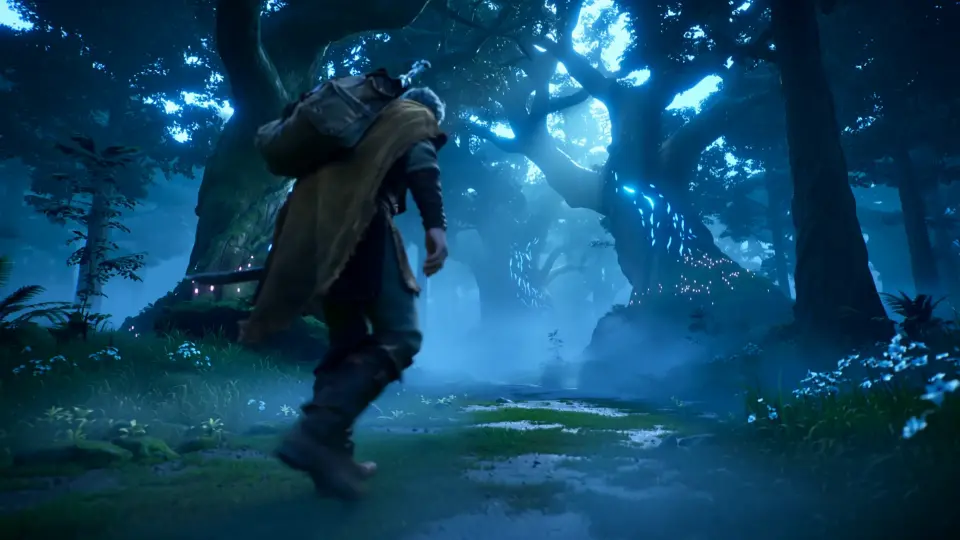
- “A weary adventurer enters a misty enchanted forest. The scene begins as a wide shot of massive glowing trees, bioluminescent flowers lighting the path. As he steps forward, the camera lowers to ground level, following his boots as fog curls around them.”
With kling 2.5 Turbo Pro, you can capture epic scope and adventure in your clips.
5.3 Horror / Thriller
- “A slow dolly shot down an abandoned hospital corridor. Fluorescent lights flicker overhead, broken tiles scatter across the floor, and a shadowy figure appears briefly at the far end before vanishing. The soundless tension builds as the camera creeps closer, capturing the peeling paint and eerie silence.”
- “A candlelit room with a terrified man sitting alone at a table. The camera circles him slowly as whispers echo faintly in the darkness. Behind him, a shadowy figure emerges out of focus, and the shot ends with a sudden crash as the candle flickers violently.”
Atmosphere is everything. Kling 2.5 Turbo captures subtle horror tension through lighting and pacing.
5.4 Romance / Drama
- “Two lovers stand in the rain on a quiet city street. The neon glow of a diner sign reflects off puddles as the camera closes in on their embrace. Raindrops hit the lens, giving a raw handheld effect, while their faces light up with relief and love.”
- “A sunlit park in springtime. A couple sits under a cherry blossom tree as pink petals fall gently around them. The camera uses a soft-focus lens effect, creating a dreamy haze, then slowly zooms into their hands clasping together.”
Here, kling 2.5 excels at micro-expressions and emotional storytelling.
5.5 Commercial / Marketing
- “A close-up rotating product shot of a luxury perfume bottle placed on a marble pedestal. Golden light shines from above, casting soft reflections on the surface. The background is a gradient cinematic fade, with camera angles sweeping to highlight glass textures and liquid movement inside.”
- “A sleek sports car racing along a coastal highway at sunrise. The shot starts with a drone overhead view of the ocean waves, then cuts to a low angle tracking shot of the car speeding past cliffs. Lens flares streak across the hood as sunlight glints off the metallic paint.”
Kling 2.5 Turbo Pro is perfect for branded, polished storytelling.
6. Tips for Refining Your Prompts in Kling 2.5 Turbo Pro
- Start small. Test with short clips before scaling up.
- Use cinematic terms. Words like tracking shot, dolly zoom, or lens flare make a huge difference.
- Lock frames. Use the first/last frame lock to stitch scenes smoothly.
- Experiment with tone. Try words like melancholic, triumphant, eerie, hopeful.
Each refinement helps kling 2.5 Turbo deliver results closer to your vision.
7. Limitations to Keep in Mind
Even though kling 2.5 AI is powerful, there are things to consider:
- Scene Lengths: Ultra-long scenes still work best when split into smaller clips.
- Audio: No native sound yet — you’ll need to add your own audio track.
- Credits: Highly detailed prompts, longer clips, or higher resolutions consume more credits.
- Iterations: Multi-character fight scenes or unusual lighting may require a few re-renders.
8. Conclusion
Prompts are your superpower. With the right detail, kling 2.5 Turbo Pro transforms ideas into full-blown cinematic stories. Whether you’re crafting a sci-fi chase, a fantasy epic, or an emotional ad, your words become the director’s lens.
So, don’t hold back. Experiment, refine, and push the boundaries of what AI video can do. Start building your cinematic world with kling 2.5 Turbo today on VideoWeb — and watch your imagination turn into film.











