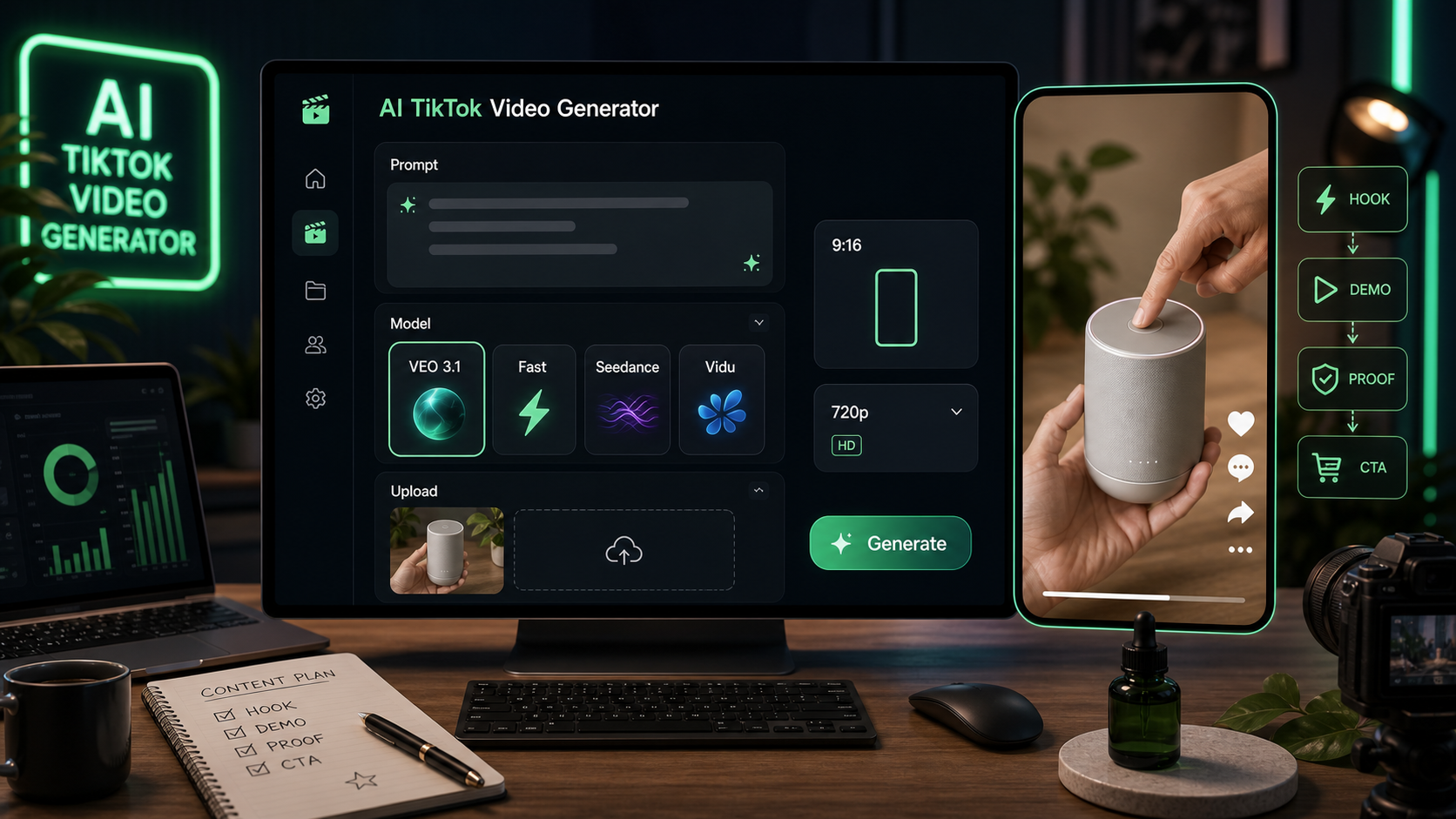
創作者與小型團隊在需要快速產出直式廣告概念、產品示範、創作者反應,以及短鉤子測試、又不想每個草稿都從零開始拍攝時,會使用 TikTok 影片生成器。VideoWeb AI 很適合做這件事,因為它的 TikTok 工具是圍繞著一個簡單的 AI 生成面板打造:選擇模型、(可選)加入 Start Frame 起始幀圖片、撰寫提示詞、設定直式格式,然後生成一個短影音概念。
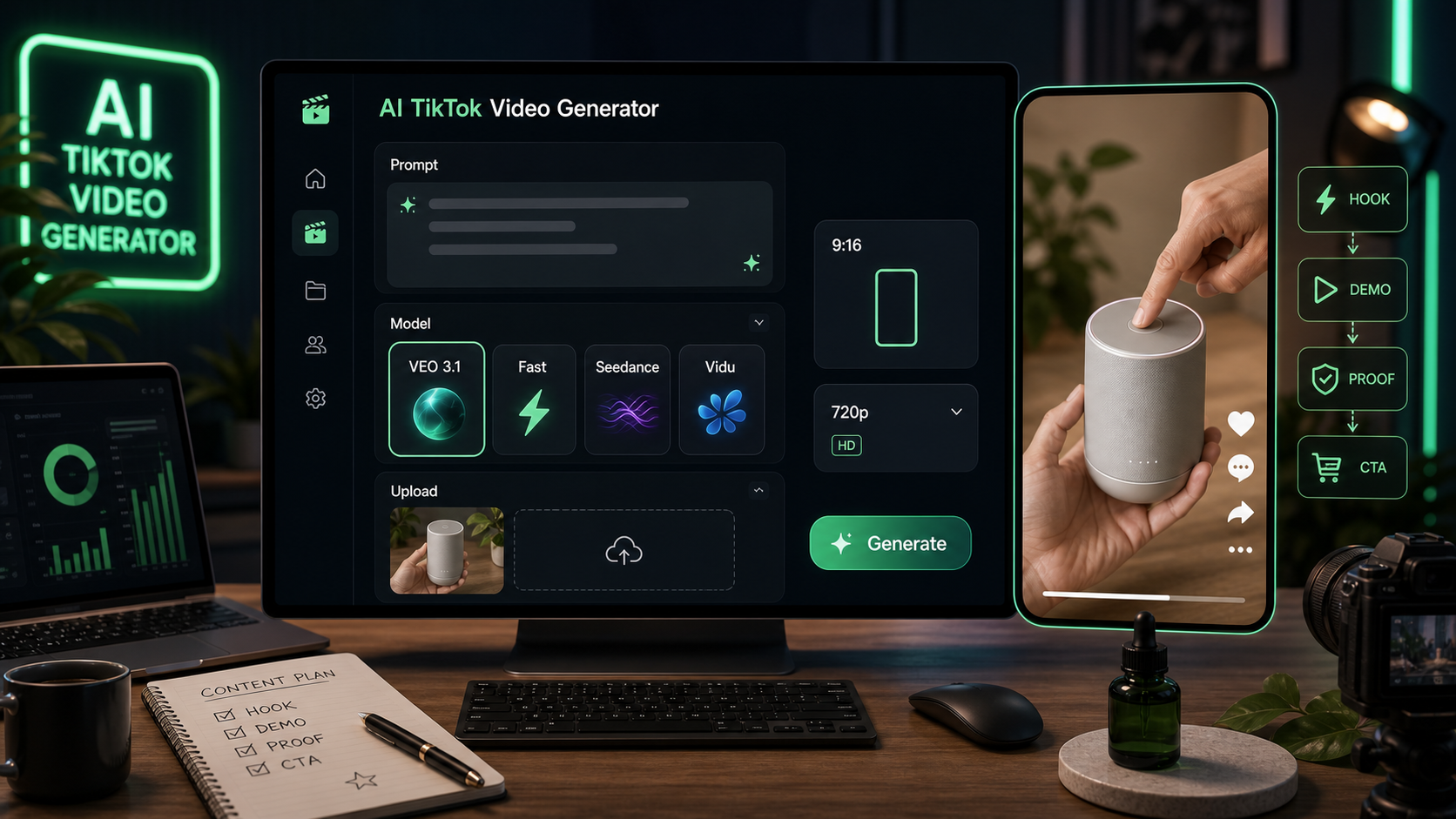
本指南會示範如何使用 VideoWeb AI 的 AI TikTok 影片生成器 來做 UGC 風格草稿,並提供可直接複製使用的提示詞,涵蓋產品示範、創作者反應、開箱、見證、前後對比風格概念,以及短廣告變體。請把輸出視為創意草稿或廣告概念。在發佈或投放付費廣告前,務必確認產品宣稱、商業音樂權利、平台廣告規範、揭露需求,以及上傳素材的使用權。
VideoWeb AI 快速工具流程
最快的流程是先有一個清楚的產品角度,接著用 VideoWeb AI 的 TikTok 工具把這個想法轉成直式草稿。在工具頁面上,可見的控制項包含:模型選擇、VEO 3.1、VEO 3.1 Fast 版本、可選的 Start Frame 圖片上傳、AI Generation 面板、提示詞輸入框、Translate 開關、Optimize Prompt 選項、9:16 直式比例、720p 輸出、Public 開關,以及 Generate 按鈕。
在模型選擇上,你可能會看到如 VEO 3.1、Seedance 1.5 Pro、Seedance 2.0、Vidu Q3 等選項。當你想測試細緻的產品場景、創作者動作,以及更精緻的短影音想法時,使用 VEO 3.1 AI 影片生成器。當你想要另一套同樣強大的 TikTok 風格廣告概念短影音流程時,使用 Seedance 2.0 影片生成器。
基本步驟:
- 開啟 VideoWeb AI 的 TikTok UGC 影片生成器。
- 選擇模型,例如 VEO 3.1、VEO 3.1 Fast、Seedance 2.0、Seedance 1.5 Pro 或 Vidu Q3。
- 如果產品一致性很重要,可上傳產品圖片作為可選的 Start Frame 起始幀。
- 將結構化提示詞貼到提示詞輸入框。
- 若你希望工具擴寫或潤飾想法,可使用 Optimize Prompt。
- 比例維持 9:16,以符合 TikTok、Reels 與 Shorts。
- 若想要較輕量的草稿輸出,選擇 720p。
- 依你的隱私偏好檢查 Public 開關。
- 點擊 Generate,接著針對鉤子、鏡頭風格、CTA 或產品露出調整提示詞再生成。
因此,當你需要用於創意審核的快速草稿、而非可直接用於宣稱的最終廣告時,VideoWeb AI 會是一個實用的 TikTok 短影片 AI 工具。
可重複使用的 TikTok UGC 提示詞公式
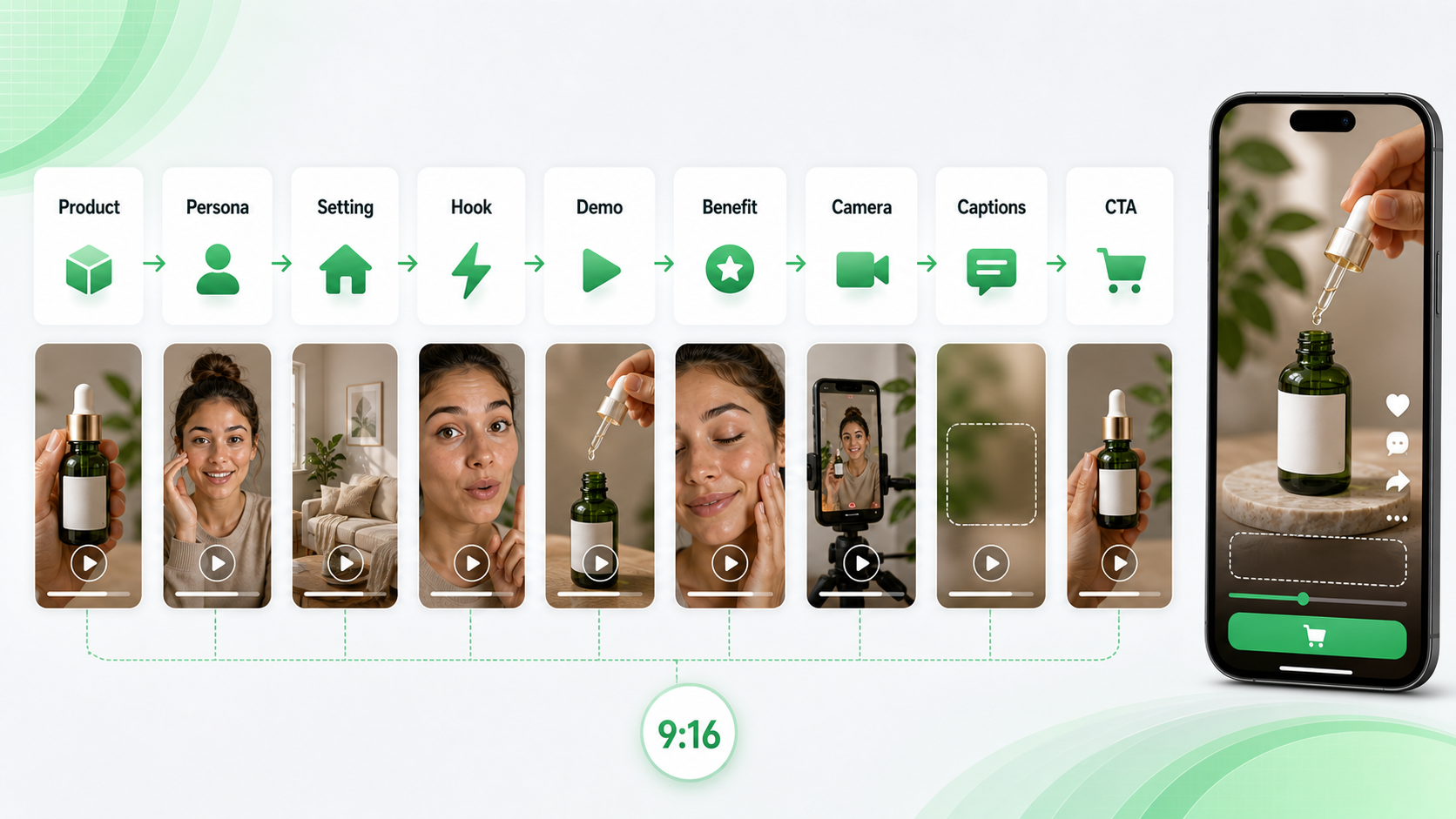
當你想要用 AI 生成 TikTok 影片 ,且風格偏隨興、以產品為主時,使用這個公式:
Create a 9:16 TikTok-style UGC video for [product/service]. Scene: [creator/persona] films in [realistic setting] using a casual phone-camera style. Hook: [first 2-second attention grabber]. Show [main product action/demo]. Emphasize [benefit] without exaggerated claims. Mood: authentic, natural, conversational. Camera: handheld, slight movement, close-up product visibility. Add space for short captions. End with [CTA]. Duration: [8-15 seconds].
這個結構有效,因為它告訴生成器:開頭幾秒要發生什麼、產品做了什麼、畫面感覺應該怎樣,以及行動呼籲該放在哪裡。TikTok 影片提示詞生成器 的好用程度取決於你提供的創意簡報,所以避免像「做一支會爆紅的廣告」這種模糊提示。請明確要求鉤子、示範、一個簡單的好處,以及可信的結尾。
何時使用 AI UGC 影片工具
當你想在投入真人製作之前先做出創作者風格概念時,使用 AI UGC 影片生成器。它特別適合用來產出粗略的廣告角度、UGC 腳本、產品示範想法,以及以手機為先的分鏡草稿。
對於付費社群投放,UGC 影片廣告生成器 可以幫你圍繞同一個產品探索更多變體。品牌可能會先測試「問題鉤子」、「好奇鉤子」、「創作者反應」以及「先示範」版本,再去找真正的創作者或剪輯師下簡報。AI UGC 廣告影片製作工具 也能幫電商團隊把產品賣點變成一個簡單的創作者風格情境。
需要對鏡頭說話的提示詞、見證與個人反應形式時,使用 創作者風格 UGC 影片生成器。當產品動作比創作者臉部更重要時,使用 AI 產品示範影片生成器。以下提示詞是作為創意草稿的 UGC 影片提示詞範例,並非保證廣告成效的公式。
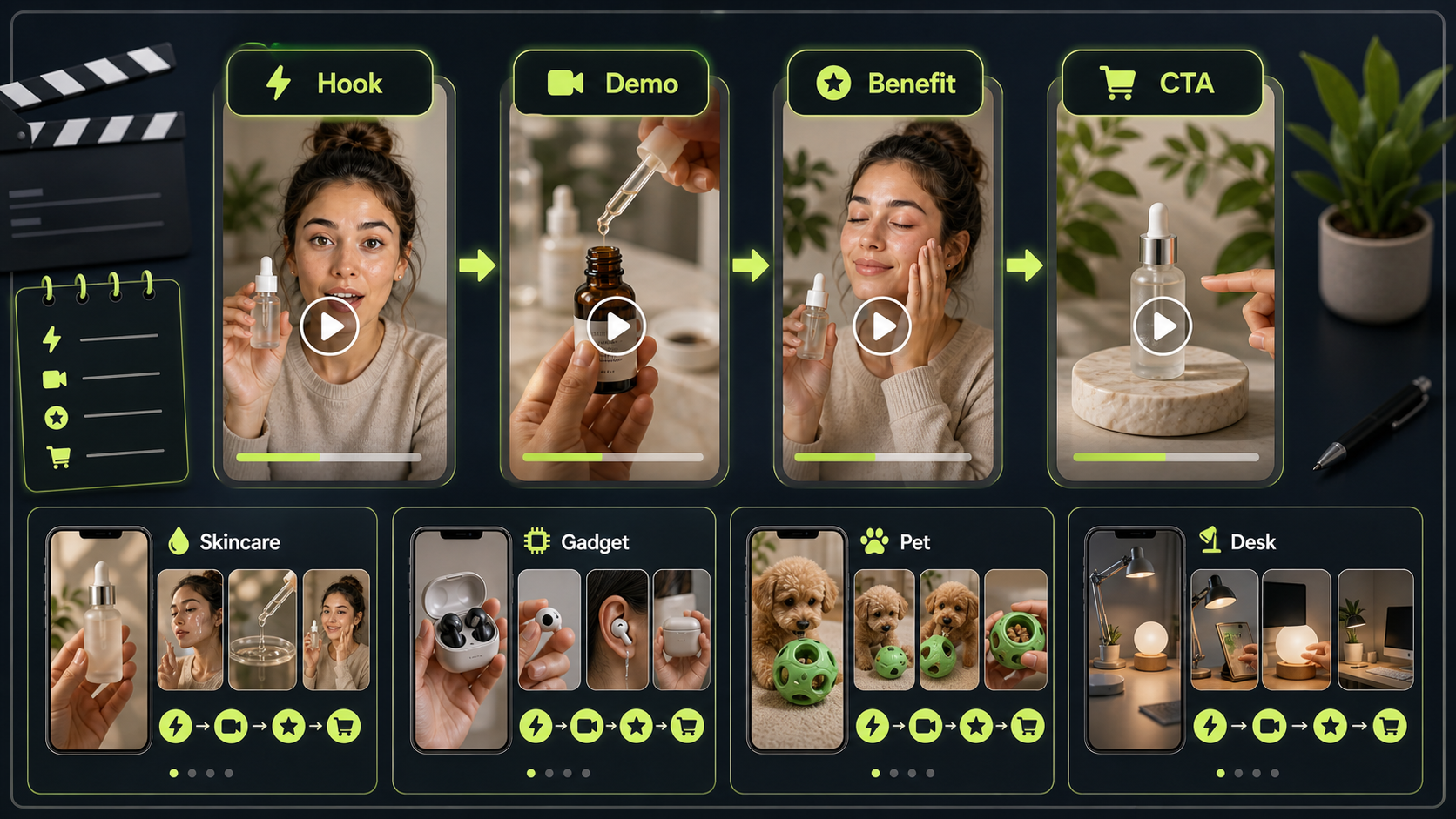
12 個可直接複製使用的 TikTok UGC 影片提示詞
把這些貼進 VideoWeb AI,然後按需求替換產品細節、場景、時長與 CTA。針對 VEO 3.1 TikTok 影片提示詞,請讓場景更具體,並要求直式取景、產品特寫與短字幕留白。針對 Seedance 2.0 TikTok 提示詞,請讓動作清楚、廣告想法能在幾秒內讀懂。
1. 護膚精華示範
Create a 9:16 TikTok-style UGC video for a skincare serum. A young creator films in a bathroom mirror with soft morning light. Hook: "I didn't expect this texture." Show the serum dropper, apply one drop on the hand, then smile naturally. Keep it casual, realistic, and product-focused. End with: "Try it in your morning routine."
適合用在柔和的美妝示範,宣稱以觸感或日常流程為主,而非醫療效果。
2. 無線迷你麥克風
Create a vertical UGC video for a wireless mini microphone. A creator records in a bedroom desk setup. Hook: "Your phone audio probably sounds like this." Show the microphone clipped on, then a quick before-and-after recording moment. Natural handheld camera, clear product close-up, simple captions, friendly tone.
這很適合用於 VEO 3.1 產品廣告影片提示詞,因為需要產品特寫與前後對比概念,同時避免誇大效能。
3. 隨身果汁機
Generate a TikTok UGC ad for a portable blender. Scene: kitchen counter, creator adds fruit and milk, blends quickly, then pours into a cup. Hook: "I made this smoothie in under one minute." Keep the video casual, bright, and realistic. Product should stay visible in every key shot.
適用於產品動作視覺上簡單且很療癒的品類。
4. 桌面收納架
Create a 12-second TikTok product demo for a desk organizer. A creator shows a messy desk, places items into the organizer, then reveals a cleaner workspace. Hook: "This fixed my desk chaos." Handheld phone camera, natural daylight, quick cuts, satisfying transformation, no exaggerated claims.
這是安全的前後對比概念,因為呈現的是收納動作,而不是敏感或不切實際的結果。
5. 運動水壺
Create a TikTok-style UGC video for a fitness water bottle. Scene: gym locker room and treadmill area. Hook: "This is the bottle I actually remember to bring." Show the handle, straw lid, and bottle fitting into a gym bag. Energetic but authentic, vertical framing, simple caption space.
健身相關宣稱要務實,聚焦在使用方式、便攜性與融入日常。
6. 手機支架
Generate a creator-style UGC video for a phone stand. Scene: student desk, laptop open, phone on stand during a video call. Hook: "Tiny thing, huge desk upgrade." Show setup, angle adjustment, and hands-free use. Keep it practical, relatable, and clean.
這是一個很強的 UGC 廣告素材 AI 工具 提示詞,因為好處在單一短場景就能看見。
7. 旅行後背包
Create a TikTok UGC video for a travel backpack. Scene: creator packing clothes, laptop, charger, and small pouch. Hook: "I packed three days into one bag." Show compartments clearly, natural home lighting, fast but readable cuts, final mirror shot with backpack on.
請要求「清楚可讀的剪輯」,才能讓夾層真的看得見。
8. AI 寫作工具
Generate a vertical UGC ad for an AI writing tool. Scene: creator at a laptop, frustrated with a blank document, then uses the tool to generate ideas. Hook: "When your brain has zero ideas..." Show screen-like visual without readable real UI text. End with: "Start with a better draft."
在避免假介面細節的同時,讓 SaaS 流程依然清楚。
9. 咖啡訂閱盒
Create a UGC-style TikTok video for a coffee subscription. Scene: morning kitchen, creator opens the box, smells the beans, makes coffee, and takes the first sip. Hook: "This made my Monday feel expensive." Warm lighting, cozy mood, product packaging visible, authentic reaction.
食品飲料類提示詞請聚焦感官時刻,避免健康宣稱。
10. 寵物梳毛刷
Generate a short TikTok ad for a pet grooming brush. Scene: dog owner brushing a calm dog on the floor. Hook: "Pet hair was everywhere until I tried this." Show gentle brushing, collected hair, and happy pet moment. Avoid medical claims. Keep the video warm and natural.
保持溫和操作,避免暗示獸醫等級的結果。
11. 記帳理財筆記本
Create a TikTok UGC video for a budget planner notebook. Scene: creator at a cafe table with coffee, pen, and notebook. Hook: "I needed a simpler way to track spending." Show writing categories, flipping pages, and a neat monthly layout. Calm, relatable, lifestyle-focused.
金融相關產品請避免保證省錢或財務成果。
12. 可攜式 LED 燈
Generate a 9:16 UGC video for a portable LED lamp. Scene: creator reading at night, turns on the lamp, adjusts brightness, then places it beside a bed. Hook: "This little lamp saved my night routine." Cozy lighting, realistic bedroom, product close-ups, soft ending CTA.
這是很好的簡單產品示範,因為光線變化就能支撐整支廣告。
模型建議:VEO 3.1 與 Seedance 2.0
當影片需要更細緻的鏡頭行為、手部操作的產品動作,或更精緻的創作者廣告概念時,使用 VEO 3.1 UGC 影片工作流 提示詞。VEO 3.1 直式影片生成器 的流程在你明確指定 9:16、產品特寫可見、手持晃動、字幕留白,以及 8–15 秒時長時最有效。你也可以用 VEO 3.1 短影音點子 先草擬多個角度,再挑一個進剪輯。
當你想要更清楚的短片動作與更多廣告變體時,使用 Seedance 2.0 UGC 影片提示詞。Seedance 2.0 產品影片工作流 很適合開箱、產品特寫與創作者示範。做廣告發想時,可用同一個產品但不同鉤子的 Seedance 2.0 AI 廣告影片點子 生成多個草稿,再比較哪個最容易看懂。
不論哪個模型,提示詞都應守住基本要素:9:16 格式、產品要早早出現、自然光、隨性手機鏡頭取景、短字幕、清楚 CTA。
短廣告變體提示詞
當你想用 TikTok 廣告影片生成器 來快速測試時,使用這些更短的變體:
- 問題鉤子:"Create a 9:16 UGC video for [product]. Start with [specific problem], then show the product solving one simple moment. Use handheld phone camera, natural light, product close-up, and end with [CTA]."
- 創作者反應:"Create a 10-second creator reaction video for [product]. The creator tries it for the first time, reacts naturally, shows one product detail, and says [experience-based line]. Keep it casual and believable."
- 見證式草稿:"Create a testimonial-style UGC concept for [product]. The creator says, 'I've been using this for [time period], and here's what I noticed.' Show product close-up, simple demo, natural lighting, and a soft CTA."
- 開箱:"Create a 9:16 unboxing video for [product]. Show opening the package, first product close-up, one useful detail, and a short reaction. Keep cuts fast but readable."
- CTA 測試:"Create three CTA endings for the same TikTok UGC product demo: save for later, try it today, and see how it works. Keep product visible in the final shot."
這些也能支援 Seedance 2.0 短影片生成器 測試,或在你需要多個同核心概念草稿時,配合 VEO 3.1 AI 影片廣告提示詞 使用。
發佈前的安全檢查
AI 生成的 UGC 影片最好視為草稿。在你發佈或投放付費媒體前,請檢查可能造成風險的部分:
- 產品宣稱:不要暗示你無法證實的醫療、財務、身體形象或效能結果。
- 音樂與音效:在廣告中使用音訊前,確認商業音樂權利。
- 揭露:遵循平台與當地對 AI 生成內容、廣告、代言與贊助宣稱的規範。
- 視覺權利:確認你有權使用任何上傳的產品圖片、Start Frame 素材、Logo 或包裝。
- 平台規則:檢視 TikTok、Instagram、YouTube Shorts 與任何付費社群平台的廣告政策。
- 見證:不要把虛構的 AI 生成創作者包裝成真實顧客。
這能讓你的 Seedance 2.0 直式影片提示詞 與 VideoWeb AI 草稿保持實用,同時降低誤導性創意的風險。
相關文章
- How to Create Better TikTok Videos with Google Veo 3.1 on VideoWeb
- VideoWeb AI Video Generator 2026: One Hub, Every AI Video Workflow
- Seedance 2.0 Video Generation Guide: Tutorial + Prompts
- From GPT Image 2 Posters to AI Video Ads: A Practical Campaign Workflow
- Veo 3.1 vs Sora 2: Which AI Video Model Performs Better?
- Kling 3.0 AI Video Generator Guide: How to Create Cinematic Clips on VideoWeb AI
大家也在看
- UGC Video Ads Guide: How to Make UGC Ad Videos With UGC Maker AI
- Seedance 2.0 for TikTok Videos: How Creators Can Turn Ideas Into Scroll-Stopping Clips
- UGC Prompts for Seedance 2: How to Create Native AI Video Ads
- How to Create TikTok Videos with HeyDream AI That Actually Feel Native to the Feed
- How to Make TikTok UGC Videos with AI Talking Avatar Generator
- Wan 2.7 Prompt Tips: How to Make AI Videos Feel More Human and Realistic
FAQ
TikTok UGC 影片最好的提示詞結構是什麼?
使用產品、創作者人設、真實場景、兩秒鉤子、示範動作、好處、鏡頭風格、字幕留白、CTA、時長與 9:16 格式。這會同時給影片生成器故事與製作風格。
我應該上傳產品圖片作為 Start Frame 起始幀嗎?
當產品一致性很重要時(例如包裝、顏色、形狀或特定主視覺角度),使用圖片上傳作為 Start Frame。如果你只需要早期概念,文字提示詞可能就夠了。
我在 VideoWeb AI 上應該先試哪個模型?
先從 VEO 3.1 或 VEO 3.1 Fast 開始做更細緻的 TikTok 風格草稿;若你想要不同的動態風格或更快的變體測試,再試 Seedance 2.0、Seedance 1.5 Pro 或 Vidu Q3 等替代選項。
AI 生成的 TikTok UGC 影片可以用來投放付費廣告嗎?
它們可用於付費廣告概念,但在發佈或投放前,請檢查產品宣稱、音樂權利、平台規範、揭露要求與商用條款。
結論
VideoWeb AI 為創作者與行銷人提供一套實用的 AI TikTok 影片生成器 工作流:選擇模型、(可選)加入 Start Frame、貼上結構化提示詞、維持直式比例,並生成短 UGC 風格草稿。最好的提示詞具體但不過度製作,會點出產品、創作者、場景、鉤子、示範、好處、鏡頭風格、字幕留白、CTA 與時長。
把這些模板當作起點,接著用同一個產品想法去測試 VEO 3.1、Seedance 2.0 與其他可用模型。保留最強的草稿、核對宣稱,並依影片將投放的廣告平台要求完成最終版本。