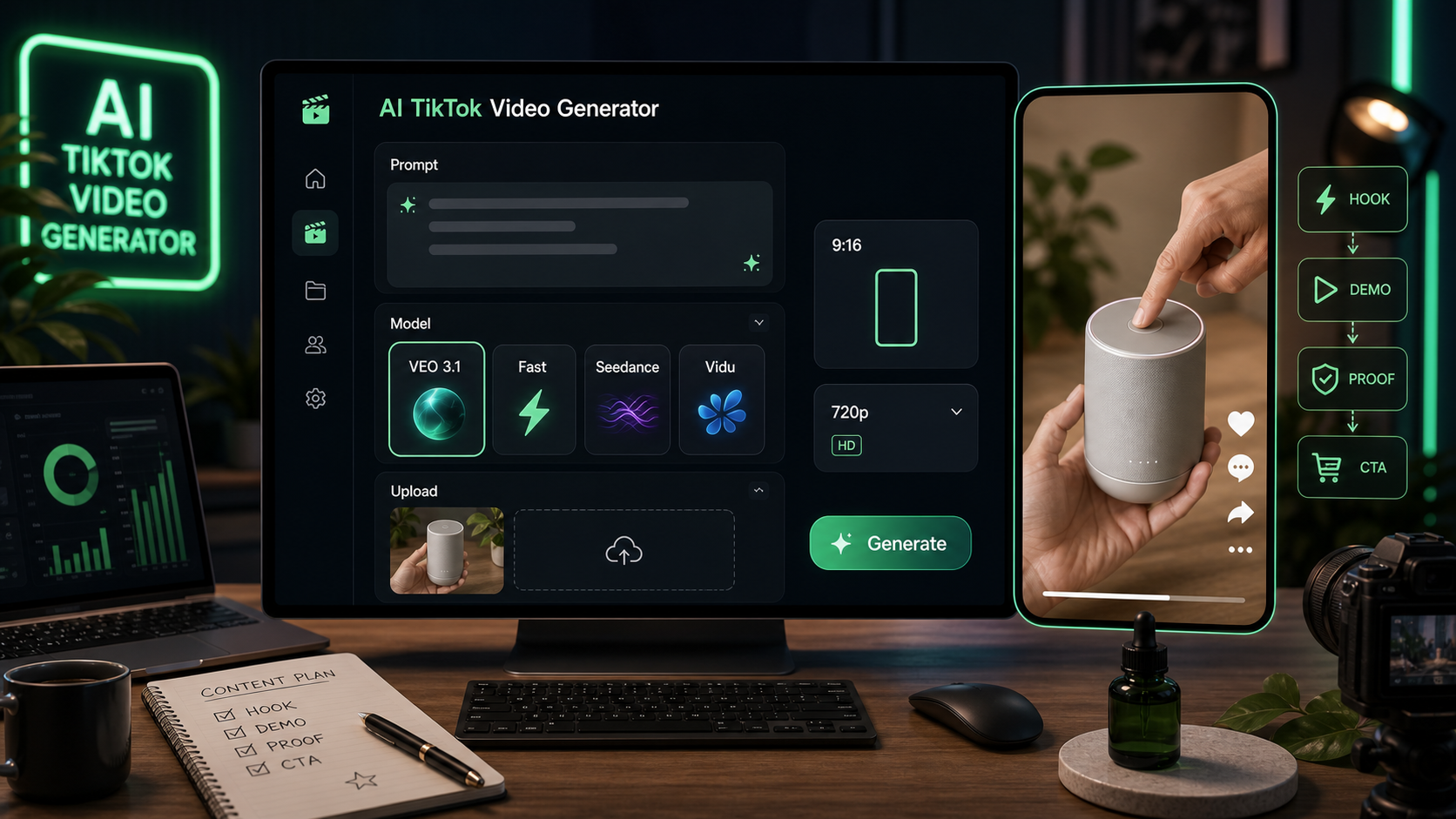
Creators und kleine Teams nutzen einen TikTok-Video-Generator, wenn sie schnell vertikale Anzeigenkonzepte, Produkt-Demos, Creator-Reactions und kurze Hook-Tests brauchen, ohne jeden Entwurf von Grund auf neu zu filmen. VideoWeb AI ist dafür hilfreich, weil das TikTok-Tool um ein simples KI-Generations-Panel aufgebaut ist: Modell auswählen, optional ein Startbild (Start Frame) hinzufügen, einen Prompt schreiben, ein vertikales Format einstellen und ein Short-Form-Video-Konzept generieren.
Dieser Guide zeigt, wie du VideoWeb AIs AI TikTok-Video-Generator für UGC-Style-Entwürfe nutzt, und liefert anschließend copy-ready Prompts für Produkt-Demos, Creator-Reactions, Unboxings, Testimonials, Before/After-Konzepte und kurze Anzeigenvariationen. Behandle die Outputs als kreative Entwürfe oder Anzeigenkonzepte. Bevor du veröffentlichst oder Paid Ads schaltest, prüfe Produktclaims, Rechte an kommerzieller Musik, Plattform-Werberichtlinien, erforderliche Offenlegungen sowie Rechte an hochgeladenen Assets.
Schneller Tool-Workflow auf VideoWeb AI
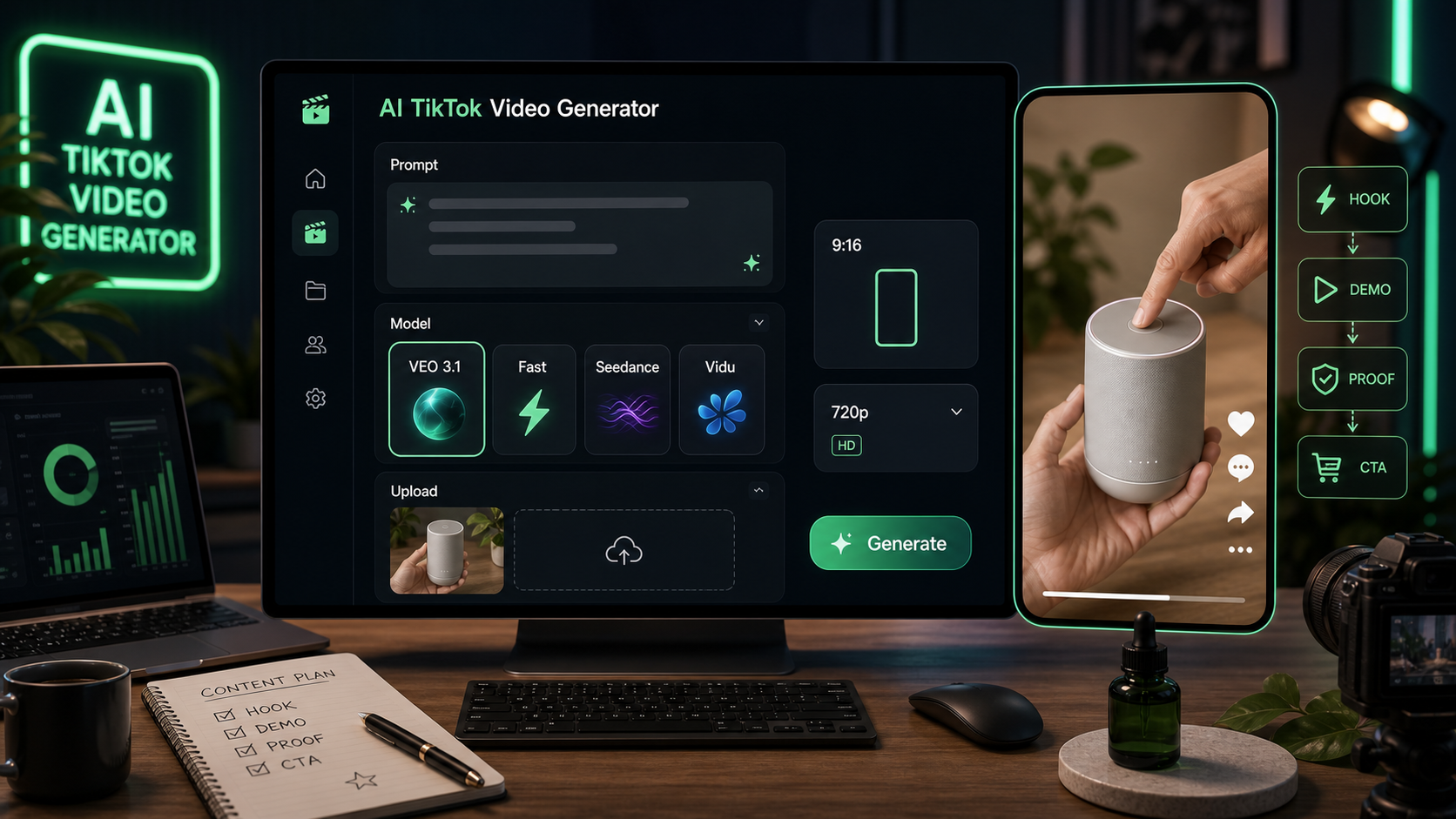
Der schnellste Workflow ist, mit einem klaren Produktwinkel zu starten und diese Idee dann mit dem VideoWeb AI TikTok-Tool in einen vertikalen Entwurf zu verwandeln. Auf der Tool-Seite umfassen die sichtbaren Controls u. a. Modellauswahl, VEO 3.1, eine VEO 3.1 Fast-Version, optionalen Bild-Upload als Start Frame, ein AI Generation Panel, ein Prompt-Feld, einen Translate-Toggle, eine Optimize-Prompt-Option, 9:16-Hochformat, 720p-Output, einen Public-Toggle und einen Generate-Button.
Bei der Modellauswahl kannst du Optionen wie VEO 3.1, Seedance 1.5 Pro, Seedance 2.0 und Vidu Q3 sehen. Nutze den VEO 3.1 AI video generator, wenn du detaillierte Produktszenen, Creator-Bewegungen und polished Short-Form-Video-Ideen testen willst. Nutze den Seedance 2.0 video generator, wenn du einen weiteren starken Short-Video-Workflow für TikTok-Style-Anzeigenkonzepte möchtest.
Grundschritte:
- Öffne den VideoWeb AI TikTok UGC video generator.
- Wähle ein Modell, z. B. VEO 3.1, VEO 3.1 Fast, Seedance 2.0, Seedance 1.5 Pro oder Vidu Q3.
- Lade optional ein Produktbild als Start Frame hoch, wenn Produktkonsistenz wichtig ist.
- Füge einen strukturierten Prompt in das Prompt-Feld ein.
- Nutze Optimize Prompt, wenn das Tool die Idee ausbauen oder glätten soll.
- Lass das Seitenverhältnis bei 9:16 für TikTok, Reels und Shorts.
- Wähle 720p, wenn du einen leichten Draft-Output möchtest.
- Prüfe den Public-Toggle je nach deiner Datenschutzpräferenz.
- Klicke Generate und überarbeite dann den Prompt für Hook, Kamerastil, CTA oder Produktsichtbarkeit.
Damit ist VideoWeb AI ein praktisches AI tool for TikTok short videos, wenn du schnelle Entwürfe für die kreative Abstimmung brauchst, nicht final claims-ready Ads.
Wiederverwendbare TikTok-UGC-Prompt-Formel
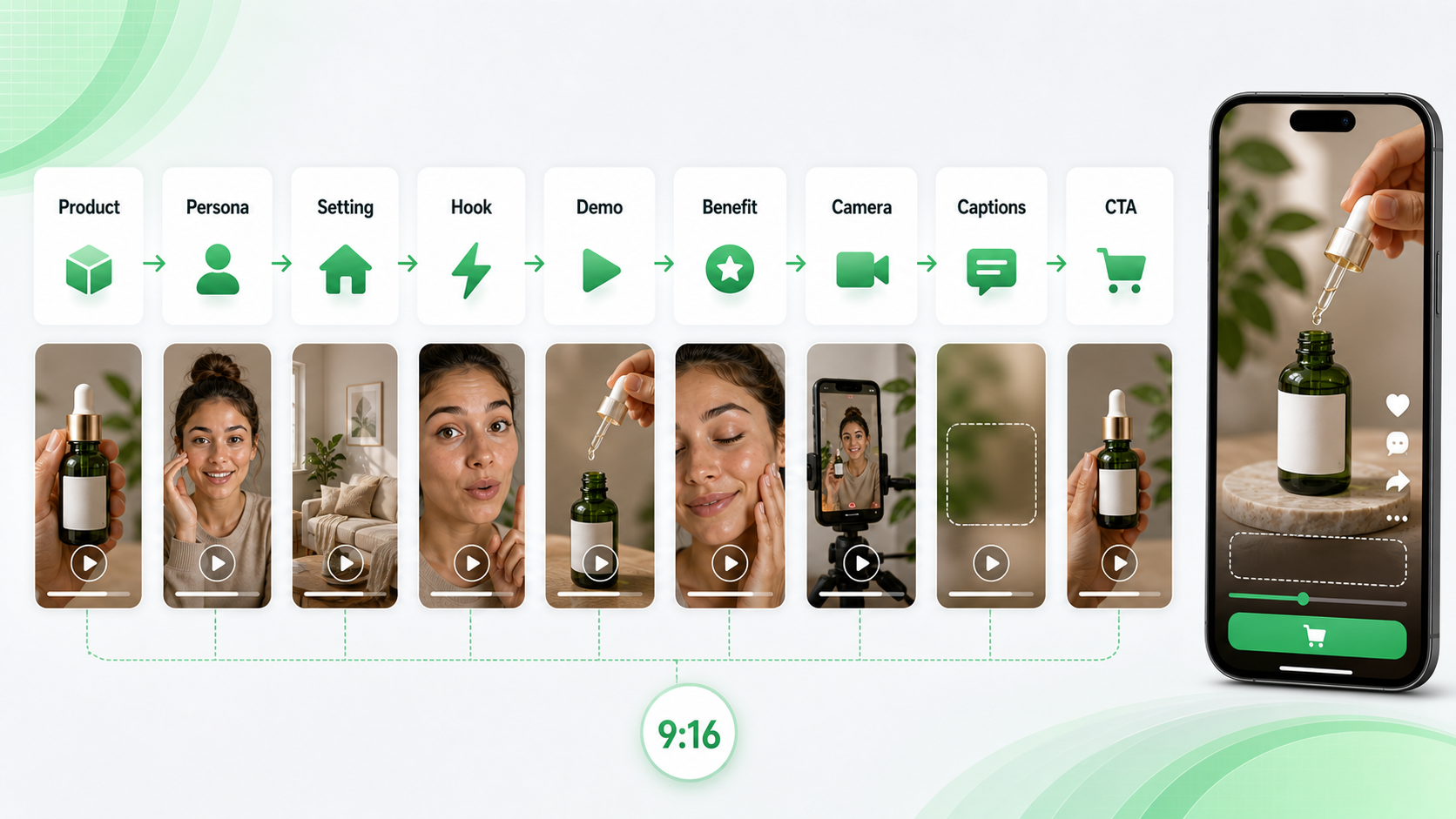
Nutze diese Formel, wenn du generate TikTok videos with AI willst, die casual wirken und klar produktgeführt sind:
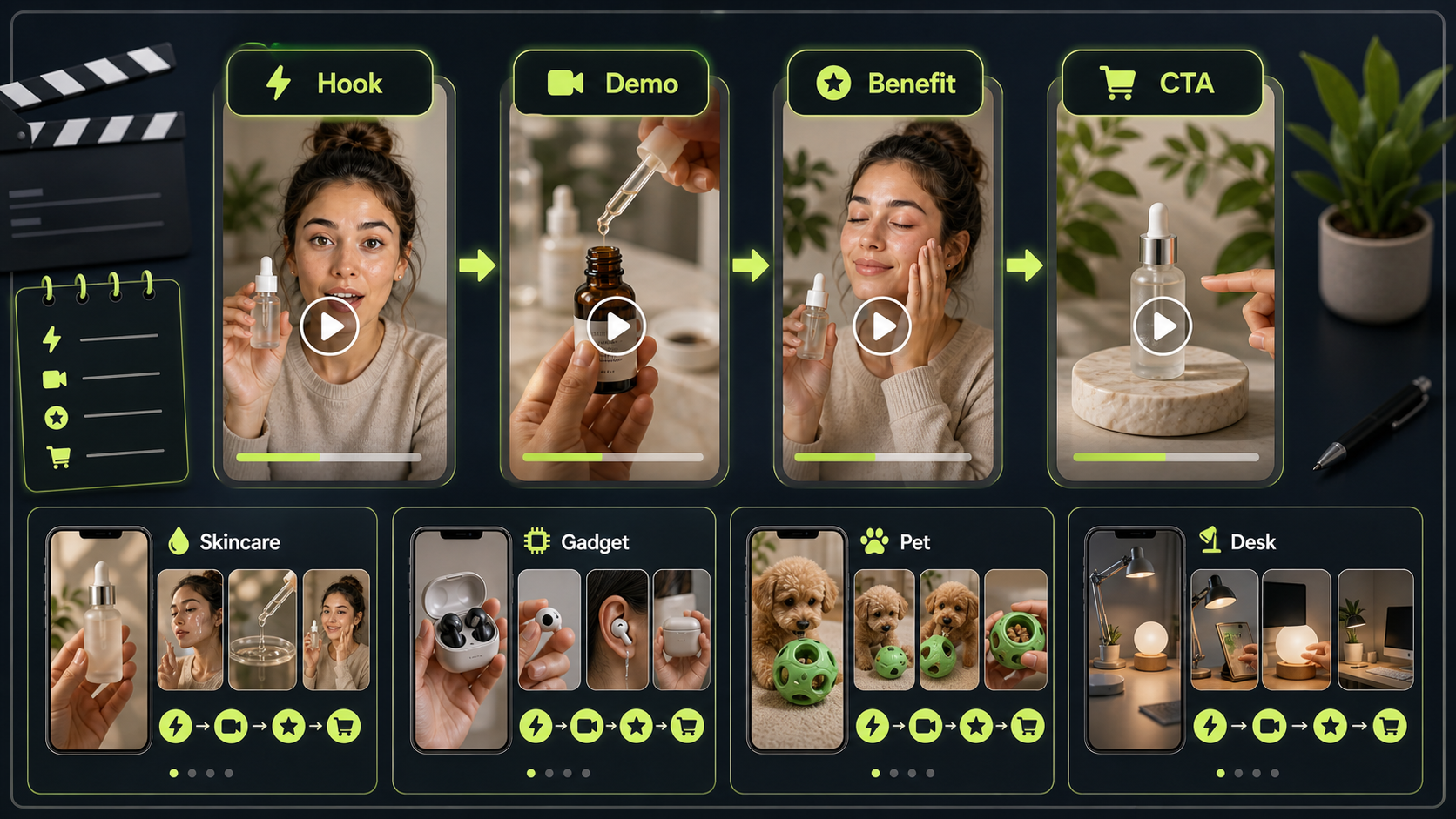
Create a 9:16 TikTok-style UGC video for [product/service]. Scene: [creator/persona] films in [realistic setting] using a casual phone-camera style. Hook: [first 2-second attention grabber]. Show [main product action/demo]. Emphasize [benefit] without exaggerated claims. Mood: authentic, natural, conversational. Camera: handheld, slight movement, close-up product visibility. Add space for short captions. End with [CTA]. Duration: [8-15 seconds].
Diese Struktur funktioniert, weil sie dem Generator sagt, was in den ersten Sekunden passiert, was das Produkt tut, wie sich das Footage anfühlen soll und wo der Call to Action hingehört. Ein TikTok video prompt generator ist nur so nützlich wie das Creative-Briefing, das du ihm gibst — vermeide daher vage Prompts wie „make a viral ad“. Bitte stattdessen um eine Hook, eine Demo, einen einfachen Benefit und ein glaubwürdiges Ende.
Wann man AI-UGC-Video-Tools nutzen sollte
Nutze einen AI UGC video generator, wenn du Creator-Style-Konzepte brauchst, bevor du Zeit in echte Produktion steckst. Das ist besonders nützlich für grobe Ad-Angles, UGC-Skripte, Produkt-Demo-Ideen und mobile-first Storyboard-Entwürfe.
Für Paid Social kann ein UGC video ads generator helfen, mehr Variationen rund um ein Produkt zu explorieren. Eine Marke testet z. B. Problem-Hook, Curiosity-Hook, Creator-Reaction und eine Demo-first-Version, bevor sie einen echten Creator oder Editor briefed. Ein AI UGC ad video maker kann E-Commerce-Teams auch dabei helfen, ein Produktdetail in eine einfache Creator-Style-Szene zu übersetzen.
Nutze einen creator-style UGC video generator für Talking-to-Camera-Prompts, Testimonials und persönliche Reaktionsformate. Nutze einen AI product demo video generator, wenn die Produktaktion wichtiger ist als das Gesicht des Creators. Die Prompts unten sind als UGC video prompt examples für Creative-Drafting geschrieben, nicht als garantierte Ad-Performance-Formeln.
12 Copy-to-Use TikTok UGC Video Prompts
Füge diese in VideoWeb AI ein und ersetze dann Produktdetails, Setting, Dauer und CTA nach Bedarf. Für VEO 3.1 TikTok video prompts halte die Szene konkret und bitte um vertikales Framing, Produkt-Close-ups und Platz für kurze Captions. Für Seedance 2.0 TikTok prompts halte die Bewegung klar und die Ad-Idee in wenigen Sekunden leicht lesbar.
1. Skincare-Serum-Demo
Create a 9:16 TikTok-style UGC video for a skincare serum. A young creator films in a bathroom mirror with soft morning light. Hook: "I didn't expect this texture." Show the serum dropper, apply one drop on the hand, then smile naturally. Keep it casual, realistic, and product-focused. End with: "Try it in your morning routine."
Nutze das für sanfte Beauty-Demos, bei denen der Claim sensorisch oder routinebasiert ist, nicht medizinisch.
2. Wireless Mini-Mikrofon
Create a vertical UGC video for a wireless mini microphone. A creator records in a bedroom desk setup. Hook: "Your phone audio probably sounds like this." Show the microphone clipped on, then a quick before-and-after recording moment. Natural handheld camera, clear product close-up, simple captions, friendly tone.
Das passt gut zu VEO 3.1 product ad video prompts, weil der Prompt Produkt-Close-ups und ein Before/After-Konzept braucht, ohne die Leistung zu übertreiben.
3. Tragbarer Mixer
Generate a TikTok UGC ad for a portable blender. Scene: kitchen counter, creator adds fruit and milk, blends quickly, then pours into a cup. Hook: "I made this smoothie in under one minute." Keep the video casual, bright, and realistic. Product should stay visible in every key shot.
Nutze das, wenn die Produktaktion visuell simpel und „satisfying“ ist.
4. Schreibtisch-Organizer
Create a 12-second TikTok product demo for a desk organizer. A creator shows a messy desk, places items into the organizer, then reveals a cleaner workspace. Hook: "This fixed my desk chaos." Handheld phone camera, natural daylight, quick cuts, satisfying transformation, no exaggerated claims.
Das ist ein sicheres Before/After-Konzept, weil es eine Ordnungsaktion zeigt und kein sensibles oder unrealistisches Ergebnis impliziert.
5. Fitness-Trinkflasche
Create a TikTok-style UGC video for a fitness water bottle. Scene: gym locker room and treadmill area. Hook: "This is the bottle I actually remember to bring." Show the handle, straw lid, and bottle fitting into a gym bag. Energetic but authentic, vertical framing, simple caption space.
Halte Fitness-Claims praktisch. Fokus auf Nutzung, Portabilität und Passform in die Routine.
6. Handy-Ständer
Generate a creator-style UGC video for a phone stand. Scene: student desk, laptop open, phone on stand during a video call. Hook: "Tiny thing, huge desk upgrade." Show setup, angle adjustment, and hands-free use. Keep it practical, relatable, and clean.
Das ist ein starker Prompt für ein AI tool for UGC ad creatives, weil der Benefit in einer kurzen Szene sichtbar ist.
7. Reise-Rucksack
Create a TikTok UGC video for a travel backpack. Scene: creator packing clothes, laptop, charger, and small pouch. Hook: "I packed three days into one bag." Show compartments clearly, natural home lighting, fast but readable cuts, final mirror shot with backpack on.
Bitte um „readable cuts“, damit die Fächer tatsächlich zu sehen sind.
8. KI-Schreibtool
Generate a vertical UGC ad for an AI writing tool. Scene: creator at a laptop, frustrated with a blank document, then uses the tool to generate ideas. Hook: "When your brain has zero ideas..." Show screen-like visual without readable real UI text. End with: "Start with a better draft."
So bleibt der SaaS-Workflow klar, ohne Fake-Interface-Details zu zeigen.
9. Kaffee-Abo
Create a UGC-style TikTok video for a coffee subscription. Scene: morning kitchen, creator opens the box, smells the beans, makes coffee, and takes the first sip. Hook: "This made my Monday feel expensive." Warm lighting, cozy mood, product packaging visible, authentic reaction.
Bei Food- und Beverage-Prompts auf sensorische Momente fokussieren und Health Claims vermeiden.
10. Fellpflege-Bürste für Haustiere
Generate a short TikTok ad for a pet grooming brush. Scene: dog owner brushing a calm dog on the floor. Hook: "Pet hair was everywhere until I tried this." Show gentle brushing, collected hair, and happy pet moment. Avoid medical claims. Keep the video warm and natural.
Ruhiges Handling zeigen und keine tierärztlichen Ergebnisse implizieren.
11. Budget-Planer-Notizbuch
Create a TikTok UGC video for a budget planner notebook. Scene: creator at a cafe table with coffee, pen, and notebook. Hook: "I needed a simpler way to track spending." Show writing categories, flipping pages, and a neat monthly layout. Calm, relatable, lifestyle-focused.
Bei finanznahen Produkten keine garantierten Einsparungen oder finanziellen Outcomes versprechen.
12. Tragbare LED-Lampe
Generate a 9:16 UGC video for a portable LED lamp. Scene: creator reading at night, turns on the lamp, adjusts brightness, then places it beside a bed. Hook: "This little lamp saved my night routine." Cozy lighting, realistic bedroom, product close-ups, soft ending CTA.
Eine gute simple Produkt-Demo, weil die Lichtveränderung die gesamte Ad tragen kann.
Model-Tipps: VEO 3.1 und Seedance 2.0
Nutze VEO 3.1 UGC video workflow-Prompts, wenn das Video detailliertes Kameraverhalten, hands-on Produktbewegung oder ein polished Creator-Ad-Konzept braucht. Ein VEO 3.1 vertical video generator-Workflow funktioniert am besten, wenn du 9:16, Close-up-Produktsichtbarkeit, Handheld-Motion, Platz für Captions und eine Dauer von 8–15 Sekunden spezifizierst. Du kannst auch VEO 3.1 short-form video ideas nutzen, um mehrere Angles zu entwerfen, bevor du einen zum Editieren auswählst.
Nutze Seedance 2.0 UGC video prompts, wenn du klare Short-Form-Bewegung und Anzeigenvariationen willst. Ein Seedance 2.0 product video workflow kann gut für Unboxings, Produkt-Close-ups und Creator-Style-Demonstrationen funktionieren. Für Ad-Ideation teste Seedance 2.0 AI ad video ideas mit demselben Produkt, aber unterschiedlichen Hooks, und vergleiche dann, welcher Draft am leichtesten zu verstehen ist.
Für jedes Modell sollte der Prompt die Basics absichern: 9:16-Format, Produkt früh sichtbar, natürliches Licht, casual Phone-Camera-Framing, kurze Captions und ein klarer CTA.
Short-Ad-Variation-Prompts
Nutze diese kleineren Variationen, wenn du einen TikTok ad video generator-Workflow für schnelles Testing willst:
- Problem hook: "Create a 9:16 UGC video for [product]. Start with [specific problem], then show the product solving one simple moment. Use handheld phone camera, natural light, product close-up, and end with [CTA]."
- Creator reaction: "Create a 10-second creator reaction video for [product]. The creator tries it for the first time, reacts naturally, shows one product detail, and says [experience-based line]. Keep it casual and believable."
- Testimonial-style draft: "Create a testimonial-style UGC concept for [product]. The creator says, 'I've been using this for [time period], and here's what I noticed.' Show product close-up, simple demo, natural lighting, and a soft CTA."
- Unboxing: "Create a 9:16 unboxing video for [product]. Show opening the package, first product close-up, one useful detail, and a short reaction. Keep cuts fast but readable."
- CTA test: "Create three CTA endings for the same TikTok UGC product demo: save for later, try it today, and see how it works. Keep product visible in the final shot."
Diese unterstützen auch Seedance 2.0 short video generator-Tests oder VEO 3.1 AI video ad prompts, wenn du mehrere Drafts aus demselben Kernkonzept brauchst.
Safety-Checks vor der Veröffentlichung
KI-generierte UGC-Videos sind am besten als Entwürfe zu behandeln. Bevor du veröffentlichst oder Paid Media schaltest, prüfe die Punkte, die Risiko erzeugen können:
- Produktclaims: Keine medizinischen, finanziellen, Body-Image- oder Performance-Outcomes andeuten, die du nicht belegen kannst.
- Musik und Sound: Kommerzielle Musikrechte prüfen, bevor du Audio in Ads nutzt.
- Disclosure: Plattform- und lokale Regeln für KI-generierte Inhalte, Ads, Endorsements und Sponsored Claims einhalten.
- Bildrechte: Sicherstellen, dass du hochgeladene Produktbilder, Start-Frame-Assets, Logos oder Packaging verwenden darfst.
- Plattformregeln: Ad-Policies für TikTok, Instagram, YouTube Shorts und jede Paid-Social-Plattform prüfen.
- Testimonials: Einen fiktiven KI-generierten Creator nicht als echten Kunden darstellen.
So bleiben deine Seedance 2.0 vertical video prompts und VideoWeb AI Drafts nützlich, während das Risiko irreführender Creatives sinkt.
Related Articles
- How to Create Better TikTok Videos with Google Veo 3.1 on VideoWeb
- VideoWeb AI Video Generator 2026: One Hub, Every AI Video Workflow
- Seedance 2.0 Video Generation Guide: Tutorial + Prompts
- From GPT Image 2 Posters to AI Video Ads: A Practical Campaign Workflow
- Veo 3.1 vs Sora 2: Which AI Video Model Performs Better?
- Kling 3.0 AI Video Generator Guide: How to Create Cinematic Clips on VideoWeb AI
People Also Read
- UGC Video Ads Guide: How to Make UGC Ad Videos With UGC Maker AI
- Seedance 2.0 for TikTok Videos: How Creators Can Turn Ideas Into Scroll-Stopping Clips
- UGC Prompts for Seedance 2: How to Create Native AI Video Ads
- How to Create TikTok Videos with HeyDream AI That Actually Feel Native to the Feed
- How to Make TikTok UGC Videos with AI Talking Avatar Generator
- Wan 2.7 Prompt Tips: How to Make AI Videos Feel More Human and Realistic
FAQ
What is the best prompt structure for TikTok UGC videos?
Nutze Produkt, Creator-Persona, realistisches Setting, einen Zwei-Sekunden-Hook, Demo-Action, Benefit, Kamerastil, Platz für Captions, CTA, Dauer und 9:16-Format. So bekommt der Video-Generator sowohl Story als auch Produktionsstil.
Should I upload a product image as a Start Frame?
Nutze ein Bild als Start Frame, wenn Produktkonsistenz wichtig ist, z. B. bei Packaging, Farbe, Form oder einem spezifischen Hero-Produktwinkel. Wenn du nur ein frühes Konzept brauchst, kann ein Textprompt reichen.
Which model should I try first on VideoWeb AI?
Starte mit VEO 3.1 oder VEO 3.1 Fast für detaillierte TikTok-Style-Drafts und teste dann Alternativen wie Seedance 2.0, Seedance 1.5 Pro oder Vidu Q3, wenn du einen anderen Motion-Style oder schnelleres Variation-Testing willst.
Can AI-generated TikTok UGC videos be used as paid ads?
Sie sind nützlich für Paid-Ad-Konzepte, aber prüfe vor dem Veröffentlichen oder Budgeteinsatz Produktclaims, Musikrechte, Plattformregeln, Disclosures und Bedingungen zur kommerziellen Nutzung.
Fazit
VideoWeb AI bietet Creators und Marketer:innen einen praktischen AI TikTok video generator-Workflow: Modell auswählen, optional einen Start Frame hinzufügen, einen strukturierten Prompt einfügen, das Seitenverhältnis vertikal halten und einen kurzen UGC-Style-Draft generieren. Die besten Prompts sind spezifisch, aber nicht überproduziert. Sie benennen Produkt, Creator, Setting, Hook, Demo, Benefit, Kamerastil, Platz für Captions, CTA und Dauer.
Nutze diese Templates als Ausgangspunkt und teste VEO 3.1, Seedance 2.0 und andere verfügbare Modelle gegen dieselbe Produktidee. Behalte den stärksten Draft, verifiziere die Claims und finalisiere das Video gemäß der Ad-Plattform, auf der es laufen soll.