Kling Korean Baseball Effect: How to Make the Viral AI Fan-Cam Video
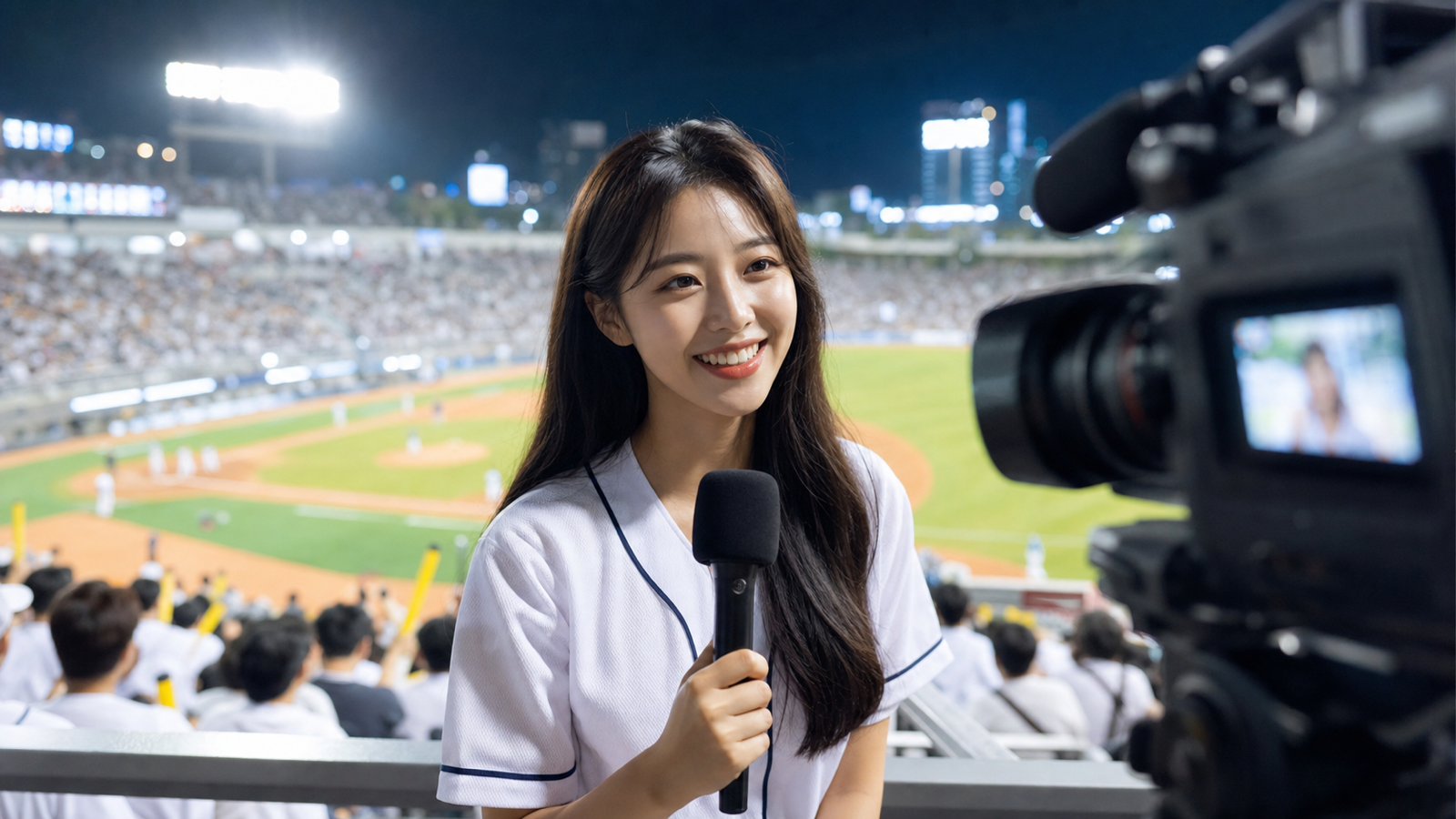
The Korean baseball fan-cam look works because it feels like a real broadcast caught a perfect three-second reaction: bright stadium lights, a close portrait, a cheering crowd, and a natural smile that does not drift into uncanny motion. With the Kling AI Video Generator on VideoWeb AI, creators can recreate that style by combining a strong reference image, a precise motion prompt, start/end frame guidance, audio options, duration settings, and a vertical ratio for TikTok or Reels.
This guide is for creators who want a practical workflow, not a vague trend description. You will learn how to prepare the portrait, write a Kling Korean baseball effect prompt, animate subtle head and eye movement, shape the stadium ambience, and export a short clip that feels native to a vertical feed.
What the Kling Korean Baseball Effect Is Trying to Recreate
The effect is a short, broadcast-style baseball fan close-up, not a full sports scene. The camera usually feels like it is zoomed in from the stands, catching a fan as they notice the camera, smile, cheer, or glance toward the field. The best versions use restraint: one subject, one emotion shift, one believable camera move.
For a convincing Kling AI baseball fan-cam video, plan around four visual cues:
- A modern Korean baseball stadium at night, with strong overhead lighting and a lively but blurred crowd.
- A clean portrait reference where the face, shoulders, and jersey area are visible.
- Broadcast camera language, such as shallow depth of field, slight handheld drift, and a close-up crop.
- Small human motion, including a natural smile, blinking, eye contact, and a gentle head turn.
The mistake is asking the model to do too much. If the prompt includes dancing, waving, a large crowd reaction, confetti, and a dramatic camera orbit, the face may change or the clip may stop feeling like a real fan-cam. Keep the action close to the reference image and let the atmosphere carry the trend.

Prepare the Portrait Before You Use an Image to Video AI Generator
The reference image controls more of the result than the prompt, so prepare it like a start frame for a close-up broadcast shot. A front-facing or three-quarter portrait usually works better than a full-body image because the model has clearer facial structure, eye direction, and shoulder position to preserve.
Before you use an Image to Video AI Generator, check the portrait against this simple list:
- Use a sharp, well-lit face with no heavy filters, sunglasses, or hands covering the mouth.
- Crop for 9:16 early if the final post is for TikTok, Reels, or Shorts.
- Use a generic baseball jersey or casual stadium outfit with no real team logo, mascot, or readable brand name.
- Leave enough space above the head so the model can add slight camera motion without cutting off the subject.
- Avoid busy backgrounds if you want the AI to replace or reinterpret the setting as a stadium.
If you want to turn a portrait into a baseball stadium video, the strongest setup is often a simple portrait plus a detailed environment prompt. You do not need the original photo to already be inside a stadium, but the subject should be easy to preserve. The AI image-to-video baseball broadcast effect works best when the subject identity is visually clear and the requested motion is modest.
For an optional end frame, create a second image that is nearly the same portrait but with a slightly bigger smile, a small head turn, or a more cheerful expression. Start and end frames should feel like two moments from the same shot. If they look too different, the clip may behave like a cut instead of a smooth fan-cam reaction.

Build a Kling Korean Baseball Effect Prompt With VideoWeb’s AI Video Prompt Generator
A good prompt describes the shot like a director, not like a keyword list. VideoWeb’s AI Video Prompt Generator is useful because it helps turn a rough idea into a more structured motion prompt before you send it into the video model.
Start with plain input such as:
Korean baseball stadium fan-cam close-up, young adult fan in a generic jersey, bright stadium lights, cheering crowd, smiles naturally at camera, subtle head turn, broadcast camera zoom, vertical TikTok video.
Then refine the output so it includes the parts that matter for the trend:
- Subject: one generic fan, natural face, no celebrity likeness.
- Setting: modern Korean baseball stadium, night game, bright lights, blurred crowd.
- Camera: broadcast fan-cam close-up, slight push-in, shallow depth of field.
- Motion: subtle eye movement, one blink, small head turn, natural smile, gentle cheering energy.
- Mood: upbeat, realistic, not exaggerated.
- Format: 9:16 vertical, short social clip.
Here is a copy-ready AI prompt for baseball fan-cam effect tests:
Use the uploaded portrait as the main subject. Create a realistic Korean baseball stadium fan-cam close-up during a night game. The subject wears a generic unbranded baseball jersey and sits among a softly blurred cheering crowd. Bright stadium lights create a clean broadcast look. The camera makes a slight handheld push-in as the subject notices the camera, smiles naturally, blinks once, and turns their head slightly toward the field. Keep facial identity stable, movement subtle, and expression believable. No real team logos, no readable signage, no mascots, no celebrity likeness. Vertical 9:16 social video.
That prompt gives the model a clear motion path without overloading it. If you need a Korean baseball AI prompt generator workflow, use the generator to improve syntax and then manually remove anything that adds excessive movement, famous teams, copyrighted mascots, or dramatic scene changes.

Create the Korean Baseball Trend With Kling AI in VideoWeb
VideoWeb AI is a practical hub for this trend because its AI Video Generator workflow is built around the controls creators actually need: model selection, prompt input, image guidance, prompt optimization, ratio, duration, and generation settings. For this specific look, choose a Kling-related model option when you want expressive short-form motion from a portrait or reference frame.
Use this workflow to create Korean baseball trend with Kling AI:
- Open VideoWeb AI and choose a Kling-related video model option, such as the Kling model page or a Kling version available in the video generator.
- Upload your portrait as the start frame or image guidance.
- Paste the refined fan-cam prompt.
- If available, add an end frame with the same person smiling slightly more or looking a few degrees toward the field.
- Choose a short duration first. A compact clip is easier to control and more natural for a fan-cam reaction.
- Set the ratio to 9:16 for TikTok, Reels, or Shorts. Use 16:9 only if you are making a blog preview, YouTube landscape version, or wider compilation.
- Add audio only when it supports the scene, such as crowd ambience, stadium cheer, or light broadcast atmosphere.
- Generate, review, and rerun with a narrower prompt if the face, jersey, or camera movement drifts.
The start/end frame approach is especially useful for the smile moment. The first frame can be a calm camera-aware expression, while the end frame can be a slightly brighter smile. Keep both frames close in pose and lighting. The model should feel like it is bridging two nearby moments, not inventing a new person.
If the first result is too stiff, add one more specific motion phrase: “a small eye-line shift toward the camera, then a natural smile.” If the result is too chaotic, remove action verbs and shorten the prompt. For this trend, the best AI video generator for fan-cam clips is the one that lets you iterate on image guidance, prompt, duration, and ratio without rebuilding the entire setup.

Format the Clip for TikTok, Reels, and Shorts
The AI video generator for TikTok baseball effect posts should be set up vertically from the beginning. A 9:16 frame changes how you crop the face, stadium lights, and crowd. If you generate a wide shot first and crop later, the fan may be too small or the broadcast close-up may lose its intimacy.
Use this vertical composition:
- Place the face in the upper-middle third, not at the very top.
- Keep the eyes visible and bright, because the trend depends on recognition and reaction.
- Let the stadium crowd fill the sides and lower background without pulling attention away from the subject.
- Keep any caption area clear, especially the lower third where platform UI and subtitles often sit.
- Avoid readable signs, real team names, or fake broadcast graphics.
For TikTok and Reels, the first second matters. Start with the subject already framed like a fan-cam, then let the smile or eye movement arrive quickly. A slow establishing shot may look cinematic, but it often weakens the viral sports trend format because viewers need to understand the effect immediately.
If you need a landscape blog image, trailer frame, or thumbnail, create a separate 16:9 render from the same concept. Do not rely on one crop for every channel. A social video wants face-first intimacy; a blog image can show more stadium context.

Fix Motion Problems Before You Publish
Most weak outputs fail in small ways: the smile becomes too wide, the eyes drift, the crowd turns into visual noise, or the jersey changes between frames. Treat the first generation as a motion test. Then adjust one variable at a time.
Use these fixes when the clip feels off:
| Problem | Likely cause | Better prompt or workflow fix |
|---|---|---|
| Face changes too much | Too much action or a weak reference image | Add “keep facial identity stable” and reduce motion to one smile and one head turn |
| Smile looks unnatural | Expression change is too large | Use “soft natural smile” instead of “big excited smile” |
| Eyes move strangely | Prompt asks for too many gaze shifts | Use “brief glance toward camera, then hold eye contact” |
| Stadium feels fake | Background request is too abstract | Mention “bright stadium lights, blurred cheering crowd, broadcast close-up” |
| Clip feels flat | No camera direction | Add “subtle handheld push-in, shallow depth of field” |
| Output is not vertical enough | Ratio or source crop mismatch | Set 9:16 before generation and crop the portrait for vertical framing |
The easiest way to improve a Kling AI baseball fan-cam video is to make the movement smaller, not bigger. A blink, a soft smile, and a slight head turn are enough. The background can supply the energy through cheering crowd ambience, stadium lights, and shallow depth of field.
When you generate prompts for Kling baseball videos, save each version with the reference image, model setting, ratio, and duration. That gives you a repeatable testing workflow instead of a pile of disconnected experiments.

Related Articles
- Kling 3.0 AI Video Generator Guide: How to Create Cinematic Clips
- VideoWeb AI Video Generator 2026: One Hub for Every AI Video Workflow
- How to Create Better TikTok Videos with Google Veo 3.1
- From GPT Image 2 Posters to AI Video Ads: A Practical Campaign Workflow
- Seedance 2.0 Video Generation Guide: Tutorial + Prompts
People Also Read
- How to Create TikTok Videos with HeyDream AI That Actually Feel Native to the Feed
- How to Use DreamMachine AI’s AI Video Generator
- SeaImagine AI Text-to-Video Guide: How to Choose Models and Create Better Clips
- How to Use the AI Music Video Generator: A Detailed Guide from Song to Video
FAQ
What is the best Kling Korean baseball effect prompt?
The best prompt describes a close-up fan-cam reaction: a generic fan in a modern Korean baseball stadium, bright stadium lights, blurred cheering crowd, subtle handheld push-in, natural smile, blink, and slight head turn. Add “keep facial identity stable” and remove exaggerated actions.
Can I create the Korean baseball trend with Kling AI from one portrait?
Yes, one clear portrait can work well when the motion is subtle. For more control, use a start frame and a similar end frame so the model has a clear expression change to follow.
Should I use 9:16 or 16:9 for the baseball fan-cam effect?
Use 9:16 for TikTok, Reels, and Shorts because the trend depends on a vertical close-up. Use 16:9 only for blog images, YouTube landscape previews, or wider editorial examples.
How do I keep the AI fan-cam face natural?
Use a sharp portrait, request small movements, avoid big facial expressions, and keep the prompt focused on one reaction. If the output looks unnatural, reduce the motion and regenerate rather than adding more prompt detail.
Can I use real team logos or player uniforms?
Avoid real team logos, copyrighted mascots, player likenesses, and readable brand names unless you have the rights. Generic jerseys, fictional signage, and identity-safe faces are safer for creator workflows and commercial drafts.
Conclusion
The Kling Korean baseball effect works when the clip feels like a real fan-cam moment, not an overproduced AI scene. Start with a clean portrait, use VideoWeb AI to combine image guidance with a focused prompt, keep the motion subtle, and set the output to vertical before generation. With the Kling AI Video Generator, the practical goal is simple: preserve the face, add believable stadium energy, and make the viewer feel like the camera just found the fan at the perfect second.











